

Avoid these 4 Data Warehousing Mistakes
Don't get a $1,571 bill from Snowflake for 100 rows of data like I did.
When I first started using Snowflake, I had no idea how warehouses worked and what made them so expensive. I didn’t know about auto resume periods, warehouse sizing, or clustering.
It seems quite naive now, looking back, but you don’t know what you don’t know. Unfortunately, these lessons are typically learned the hard way.
A few weeks in, I started a Snowflake trial to help improve my skills and experiment with my own portfolio data pipeline project. The data was filtered, and only a few hundred rows, so I figured my costs would be very low.
Well, I was wrong.
Snowflake hit me with a FAT invoice.
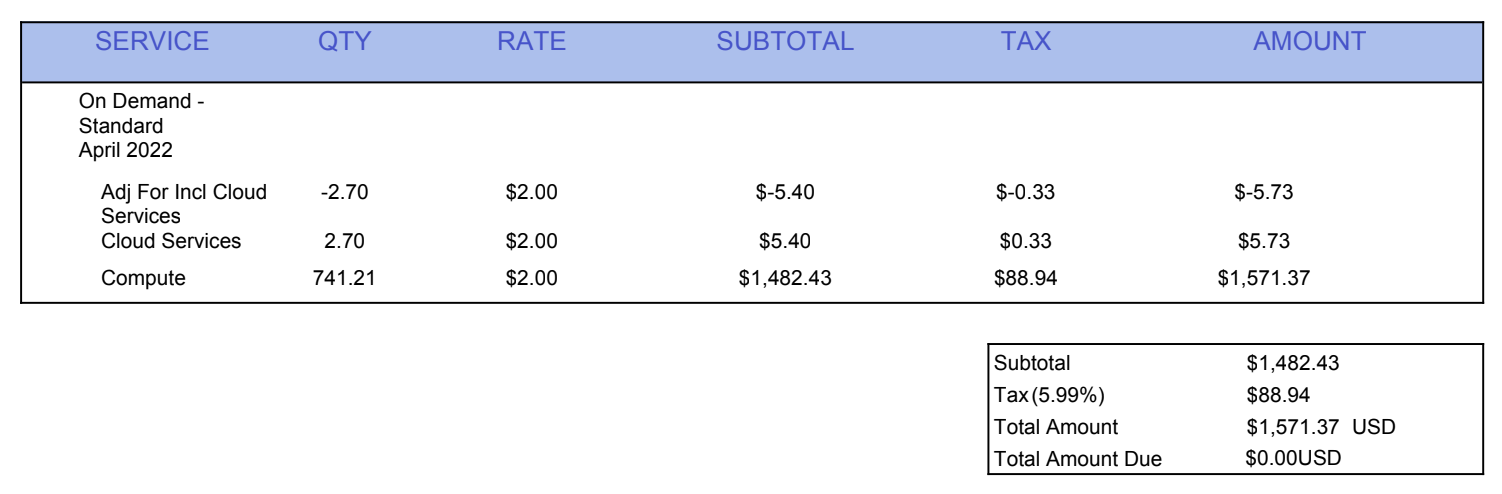
The invoice from Snowflake was for $1,571. This was my own personal project, not a project I was building using my 9-5’s Snowflake plan, which meant I owed this money. $1,571 is a lot of money for a 20-something just starting in her data career.
Little to say, I’ve never made these cost-consuming mistakes in my data warehouse ever again.
In today’s article, you’ll learn from the mistakes I’ve made over the years as an analytics engineer, so you don’t have to learn them the hard way.
Today’s newsletter is sponsored by Greybeam.
The best way to support my work is to check out the cost savings you can get with Greybeam and click the links below.

Not every query needs a warehouse. 99% of BI queries are small, scanning less than 100GB. Running that on Snowflake is like taking a helicopter to go get groceries. Greybeam acts as an intelligent routing layer, matching every workload to its most efficient compute engine:
Cost optimization: Only pay for the warehouse for the 1% that needs it
Faster queries: They run 3x faster on the right engine
Data portability. Manage your data as Apache Iceberg tables, readable by any engine
Stop spending blindly. Start saving on average 86% of your compute costs immediately. No migration. No code changes.
[ Try one month free ] - Book a demo
Mistake #1: Segregating warehouses by purpose and size.
When I designed my very first data warehouse, I thought it was best to keep resources separated by purpose. Data ingestion had its own set of resources. Ad-hoc analysis had its own set of resources. Orchestration had its own set of resources.
This meant that each of these processes had its own warehouse for compute.
While it seemed like a great idea to keep all of the workloads separate, it actually ended up costing us more money than it should have. Instead of warehouses being able to lend capacity to an intensive workload, some were left underutilized while others were forced to scale up.
Because each warehouse also has a minimum start-up cost, we paid this for each warehouse instead of only paying for one.
Instead of separating warehouses by function, create a few core right-sized warehouses that can run your workloads effectively, depending on what needs to be run and when. You can then monitor credit consumption by tag in QUERY_HISTORY and set alerts if a particular workload is burning more than expected.
Mistake #2: Not configuring auto-suspend.
My $1,500 Snowflake bill was caused by the auto-suspend periods of my warehouses being so high. And by so high, I mean 60 seconds. You wouldn’t think this is a long time to be running compute, but it is!
Auto-suspend periods define the amount of time your warehouse can go without any activity before being shut down. This means you are paying to keep it up and running only to avoid a cold start. So, if your auto-suspend is 10 minutes and a new query comes in every 8 minutes, you are paying for the warehouse to be active indefinitely.
It’s important to find the sweet spot where you aren’t continually paying to resume your warehouse when there are bursts of queries with short periods in between, but you also aren’t paying for something with no activity.
Needless to say, if you are running a small portfolio project, you can most likely set this to the lowest possible setting. 😉
Greybeam has an excellent deep dive article on all of these cost-saving hacks for Snowflake users.
Mistake #3: Building all models as incremental tables in dbt.
Just because you can, doesn’t mean you should. When I first started using dbt, I thought incremental models were the coolest feature (and still do!). I wanted to make every model an incremental model, because if I can optimize, why not!?
Well, there are repercussions when it comes to using incremental models. If you are dealing with a large volume of data, the pros greatly outweigh the cons. However, when you’re dealing with tables that otherwise take a few seconds to completely refresh, incremental builds aren’t worth the hassle.
As you know, data is messy. Incremental logic can often miss late-arriving data, not account for source records that get updated rather than just inserted, and use unreliable timestamp fields.
When you run into these types of issues, you need to fully refresh your incremental models. This ends up wasting your time with manual intervention and running up compute on large refreshes.
I always recommend building intermediate data models as views first and then materializing them as a table if needed. With mart models, start with full refresh tables and configure them to be incremental as performance calls for it. This will save you from compute costs but also unnecessary struggle.
Mistake #4: Exposing PII to the average user (especially in the age of AI).
If you’ve used any type of MCP recently, you’ve most likely exposed sensitive data. I hope that isn’t the case, but it’s becoming more and more common. We think our data is safe with these AI tools, but it’s not.
We need to protect our PII at all costs. This means that nobody should have access to PII in their data warehouse, even developers. Most of us don’t need health records, social security numbers, or phone numbers to model business metrics.
I haven’t touched Snowflake’s MCP outside of a very limited scope for this very reason. Our PII has yet to be masked, so I have yet to expose all of our data to these tools.
Before you start playing around with Snowflake MCP or a similar tool, be sure to apply data masking on PII fields in your data warehouse. You can apply data masking based on roles. If a role is any role other than admin, users should not be able to see sensitive customer data.
This will protect you from any accidental permission mixups, because God knows Claude will try to get access to as much data as it can!
I can say I’ve come a long way in my data warehousing skills from when I first became an analytics engineer years ago.
Whether you’ve been in the industry for a while or are just starting out, understanding how to save costs and improve pipeline efficiency are skills any employer will love.
Saying you saved your company $$$ thousands of dollars a month on compute costs is a HUGE flex! I honestly can’t think of anything else that’s more likely to get you a promotion or land a better role.

Have a great week!
Madison