

Let’s imagine you're a marketing manager using AI for the first time. You’re frustrated with your data analyst, who is holding you back from getting the insights that you need on the latest Meta campaign.
Your company hasn’t dabbled much in AI yet, which means it hasn’t set up any guardrails for how you can use it. This is great for you because you can quickly set up a connection to the data warehouse to get the answers you need on the campaign!
You start by finding all raw Meta data and copying it into Claude. You then tell it that you want to see how successful the latest campaign you ran was based on click-through rate and cost. You also ask it to give you the results in a pretty dashboard you can quickly copy and paste into a presentation for your team tomorrow.
Claude spits you back some nice-looking metrics and a pretty graphic, and you are instantly relieved that you now have some data to present! This means you can act fast on creating a similar campaign next week.
When your team asks about the numbers, you thank your good friend Claude for her hard work and diligence!
This is exactly what NOT to do when it comes to using data with AI.
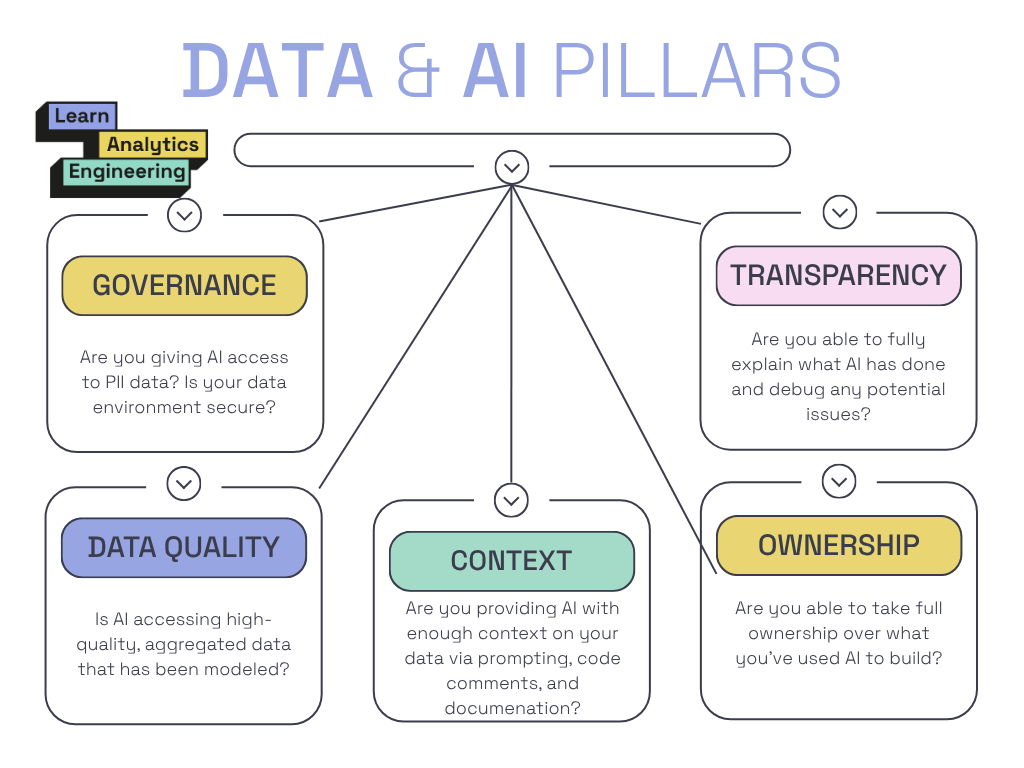
In this article, I’ll break down the five major pillars of safely using data and AI, including rules to follow.
♻️ If you’re enjoying this newsletter so far and think someone on your team (or even a stakeholder) could benefit from it, please share it with them!
AI and PII don't mix.
If we go back to our example, we broke a major pillar in the very first step. We copied sensitive data directly into Claude.
When using data with AI, you always need to have governance top of mind. This means you cannot give AI access to sensitive data. Anything that identifies a customer can be considered PII, and therefore sensitive. Think names, phone numbers, emails, social security numbers, IP addresses, and even id’s. If you are dealing with any type of medical data, you need to be even more careful or you will be breaking HIPPA.
This is why I don’t give AI agents access to my data warehouse, import CSVs, or even copy and paste data into the chat. It is always better to be safe than sorry.
Here are some rules to follow to keep your data safe:
only provide agents with highly aggregated metrics that are at a grain you feel 100% confident in
ask agents for validation queries that you can then run within your data warehouse, providing them with the results of that query (whether it was successful, if it returned records, etc.)
tag PII data so it is clear that a piece of data is sensitive
don’t give stakeholders access to raw or untransformed data in your data warehouse
always check with your legal and tech teams about the guardrails in place and what AI tools you can/cannot use
Garbage in, garbage out.
Just because data is available to use with AI, doesn’t mean it is accurate. In this example, we assumed the raw data we pasted was clean and ready to be consumed. If you know anything about raw data, that is almost never the case. There is a reason why staging models and data modeling are a best practices!
This is also a reason why we have jobs as data people… data is inherently messy.
Analytics engineers spend so much time speaking with the business and engineering to ensure data meets expectations. When you skip the well-thought-out data models, you are opening a lot of room for error.
AI agents should only have access to do that is properly cleaned and modeled. If you stakeholders have access to any raw or unclean data, that is a major red flag. You need to create more secure data governance practices with strict roles on what types of users have access to what.
Here are some rules I like to follow:
if raw data hasn’t been properly cleaned, nobody should be able to use it!
business stakeholders should only ever have access to core data models
business stakeholders should NEVER have access to raw data (they shouldn’t even be able to see these tables!)
business stakeholders and AI users need to have specific roles assigned to them that are highly governed, allowing the data team to control what they do and don’t have access to
AI is only as smart as the context you give it.
It’s important to remember that AI only has the context that you provide it. It knows nothing about your business, its particular challenges, how you work as a team, etc. It only knows the prompt and any resources that you give it access to.
In this example, we asked for click-through rate and cost. This could mean so many different things depending on your type of business. AI agents have no idea how we define these metrics unless we give it context or provide it with something like a semantic layer!
Claude in this example infers a metric definition and acts as if it is the truth.
When using data with AI, you need to provide accurate and extensive context in order to get the results you want. Even then, it’s imperative that you validate that those results match the conversations you’ve had with the business.
For example, I recently worked with Claude to help define some store-level metrics I was given. I didn’t have much context, but these were metrics that were already defined at different grains within my codebase. Claude was able to infer the correct definitions because of code comments and documented metrics already in my codebase. If we hadn’t had this information, Claude would have chosen generic definitions, referenced data models that seemed right, and most likely abandoned a lot of important filters that help get us the correct numbers.
If you can’t explain it, don’t ship it.
AI creates a black box. This means that you often can’t explain why it did something. If you can’t explain why a code change was made, you shouldn’t be using AI at all. You need to have a strong level of understanding of what AI agents are doing in order to use them!
If you can’t do what AI did yourself, the data team or someone else should be owning the task.
In this example, we presented metrics on the campaign without being able to explain how those metrics were calculated and what data it was using.
Explainability operates at two levels: what did the AI agent use (data resources) and why did it decide that (interpretability).
Again, if we can’t explain these two things, we shouldn’t be using AI to do it. This is what creates massive future tech debt and bugs that no human can solve.
You own the output, not AI.
AI isn’t responsible for AI outputs. YOU are responsible for what AI outputs, and in order to claim responsibility you need to be able to explain what it does. Explainability and accountability go hand in hand.
For everything you use AI to produce, you need to ask yourself if you feel comfortable taking full accountability of it. Because, if you don’t, it shouldn’t be produced.
With our above example, we didn’t take ownership of the work and instead gave ownership to Claude. Claude doesn’t own anything. The person who USED Claude owns the thing. Again, if you don’t understand the data sources, business logic, and full context behind what you are providing to your agent, you shouldn’t use AI at all.
When nobody takes ownership over their AI products, you see:
bugs that nobody knows how to fix or wants to fix
unanswered business questions
sloppy code and lack of documentation
As data people we’ve worked too hard at building well-documented, clear systems to let it all go to shit over AI!
➡️ If you’re struggling to safely use AI with data in your company or individual work, reach out to me by replying to this email.
I’ve helped clients build AI-ready data warehouses, streamline their governance, and even train teams in safe data practices.
And, if you’re looking to improve your AI readiness, consider upgrading to a paid subscription where I share how I’m using AI on a daily basis in the subscriber chat and sharing monthly deep-dive data and AI tutorials.
Have a great week!
Madison